The article kind of glosses over the PNG signature. There is actually a lot of thought behind using these exact 8 bytes:
The first byte is 0x89, meant to tell any text editor that this isn't a text file, and to prevent text files from being recognized as PNG. It also detects if you mistakenly transferred the file in some ASCII file mode that clears the top bit.
The next three bytes are PNG in ASCII, meant for humans looking at it in a hex editor.
The next two bytes are a Windows-style line ending (CR LF, or 0D 0A). This breaks the signature if the file mistakenly undergoes Windows->Unix line conversion
The next byte is 0x1A - End of File. This causes DOS tools to stop printing the file.
The last byte is a Unix-style line break, to detect Unix->Windows line conversions
To make the validation process complete, a process can check the integrity of the last chunk (IEND). Not only does it provide a fixed sequence of 12 bytes you can use to check that the file is complete, the fact that its length field is 0 allows you to verify that zero bytes were transferred correctly. Of course you would likely notice anyways because of the chunk checksums, but IEND allows you to fail fast and makes it easier to diagnose the actual issue.
I thought this was brilliant when I first learned it, but I've since come to think it's ridiculous. JPEG doesn't have any of these error-detection features, have you ever missed them? It seems to be the same mindset that gave us double-checksummed IDATs.
Perhaps there was a world once where this made sense, but we aren't living in it now.
Not all modem standards had built-in error detection. If you got garbage or drop outs because of line noise or someone else trying to use the parallel phone, that was all you got. The sending side did know nothing about that. For reliable transfer of binary files, software on both sides had to implement X/Y/Zmodem or some other protocol which added metadata for correctness checks. Files that were cut too soon when copying over the modem or from one floppy to the other, or because the process moving data died for some reason, were also not uncommon.
Historical 7 bit protocols were still used. Even though systems of their origin were a thing of the past, and links had 8 bit characters, existing software handling those protocols often mangled the “spare” highest bit for its own reasons.
In simple terms, the PNG header allowed to check that the file had always been handled in binary mode, and maybe even to revert some types of the damage. Those were the last days of distinction between terminal-style “text mode” processing (with hardware or software components in the middle silently converting the code pages, line endings, and control codes if they were different on two sides), and “binary mode” direct copying, soon to become the only expected option. People writing binary data to files today almost never invent the means to escape certain “special” values in anticipation of possible transfer over this or over that.
At first I thought this was kind of pointless, but I actually think this is a decent way to get to the basic principles of a file type. A sort of minimal-working-example of a file, giving you an overview of how the file works and what is required to get something valid, if uninteresting.
Yeah, this is usually the kind of thing I end up implementing on a first pass for something where I don't want to just use a library (usually "for fun" hacking projects).
1TB favicons dumped in the root is an interesting problem for crawlers. Did they make the effort of dropping the connection in a timeout or proceed to gobble up the entire thing?
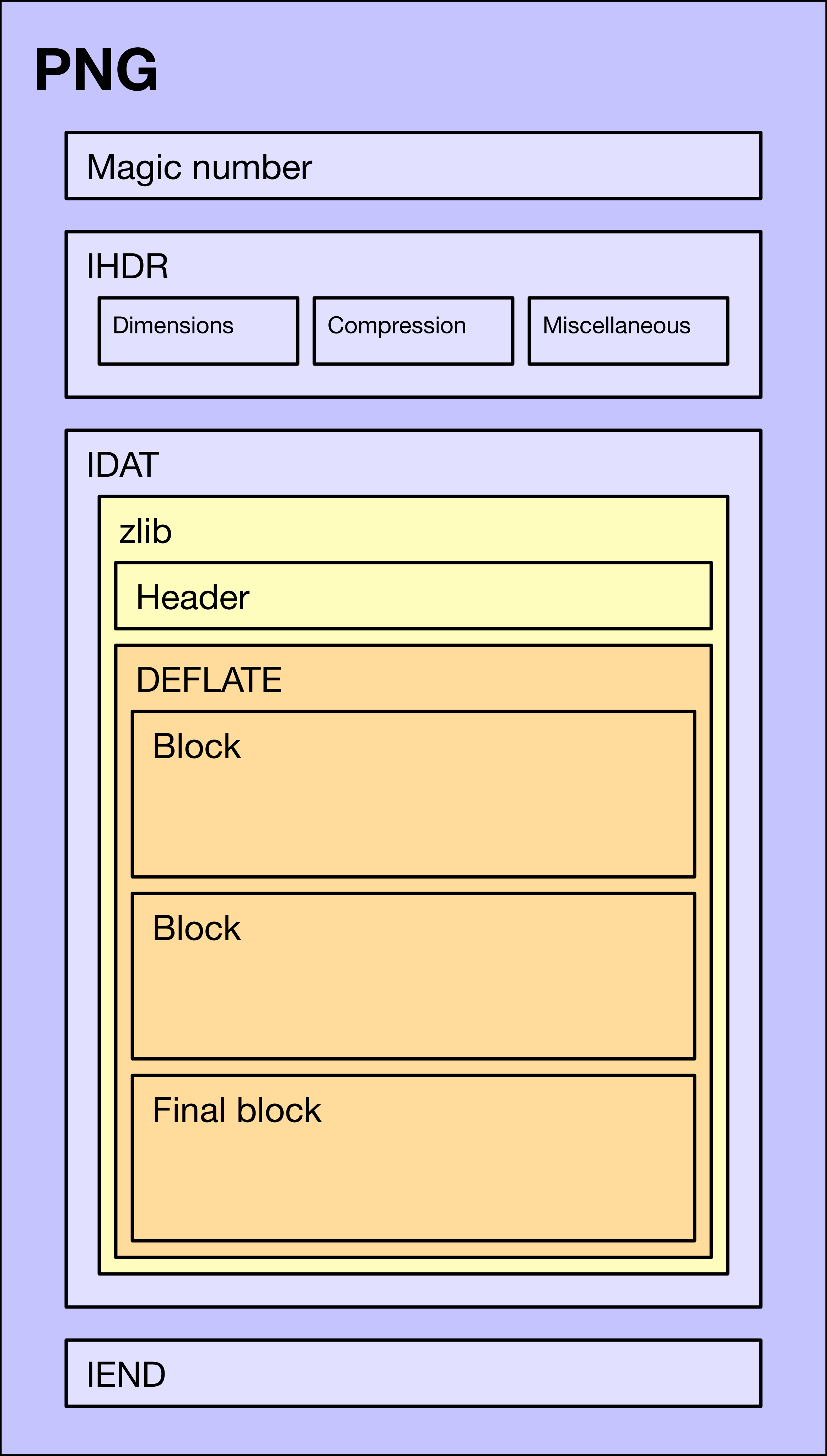
So the one thing this article doesn't explicitly justify is whether the ten-byte zlib string is truly the shortest possible. You could imagine that it might be possible to hand-craft a DEFLATE block which is only three bytes instead of four, and yet still decompresses to at least two bytes (the minimum decompressed size of a PNG scanline).
But by exhaustive search of all DEFLATE blocks that are one to three bytes in length, I can confirm the article is correct. All of them decompress to (at most) one byte of data.
Which isn't a surprising result, but I wasn't actually sure of it before trying it out.
> this article doesn't explicitly justify is whether the ten-byte zlib string is truly the shortest possible
I know the DEFLATE standard intimately and implemented a decoder and encoder (open source on my website/GitHub).
We know that the smallest image requires 2 bytes - 1 for the row filter and 1 for the pixel(s). For simplicitly, we'll assume the data is (hex) 00 00.
A DEFLATE compressed stream must have at least one block. There are three choices for each block's type - uncompressed, fixed Huffman code, and custom Huffman code. Uncompressed requires 1 byte for {type (2 bits), finality (1 bit), padding (5 bits)} and 4 bytes for the length. So that uses 5 bytes already. Using a fixed Huffman code block lets us encode those 2 bytes as 4 bytes. Using a custom Huffman code requires many, many bytes just to specify the Huffman table. Hence, the OP article's approach is justified.
> I won’t go in depth on DEFLATE here (in part because I am not an expert^4)
> 4. If you are an expert, please contact me. I want to learn!!
You already linked to "An Explanation of the DEFLATE Algorithm", which shows that you've been searching on the web already. I'm not sure if it'll make a difference, but here are a few more resources: https://www.euccas.me/zlib/ , https://en.wikipedia.org/wiki/Deflate
DEFLATE is basically huffman(lz(X)), which is obvious enough. The part that no one ever seems to motivate is how precisely you fit those together, ie. there is one tree for literals/length, another for distances, plus the extra bits.
I should note that it's hardly the best way, but it's easier to think DEFLATE as a layered algorithm: you catch repetitions via LZSS and code the remaining information with Huffman. You have two kinds of code because they have a very different distribution so it's beneficial to split them (and it's not surprising to have tens or hundreds of distributions in more sophiscated formats).
And extra bits are there because longer distances in LZSS are typically opportunistic so individual values have a low frequency (i.e. Zipfian). So exact distance 1280 and 1281 can appear only once, but maybe distances 1200--1299 appear frequently enough that you can have a distinct code for that plus two-digit adjustments. There are much more other ways to model distance distributions; for example, a set of codes for most recently used distances is common but DEFLATE is too old for that.
> Every single PNG, including this one, starts with the same 8 bytes.
This might be common on other platforms as well, but I know that Apple uses a kind of series of tests to determine the type an image is rather than trusting the extension.
As an experiment, change a PNG to have a .JPEG extension on MacOS and double-click. Preview, unsurprisingly, launches — but if you get Info on the image in Preview it indicates it is a PNG. Of course.
File extensions were the primary way to determine file type in VMS and CP/M. Consequently MS-DOS and Windows inherited that behavior.
As you said, UNIX always went with heuristics based on the file content instead (and is the primary reason many file formats have fixed bytes to aid that process).
And the web standarized on mime types transferred in the metadata, with how to set them correctly left as an exercise to the reader. Which usually means they are set based on file extension because that's faster.
There's a real-world application for this sort of things - many raster slippy maps send represent empty ocean with carefully optimised single-colour PNG files [1]
I wonder how many of these are actually carefully optimized single-colour PNG files vs... just PNG files. Going into Photopea, creating a 256x256 solid blue image, and hitting save gave me a 137 byte image. That'd be a 2nd place in that list. Doing the same in MS Paint gets 5th, beating out the last 2.
What seems more likely to me is someone didn't consider the compression settings problem worth optimizing at all (the last 2) or put some work into making sure the images were generally encoded with decent settings (the first 4). After all, optimising your best case which happens to be one of the very few images that can be cached to be reused across multiple tiles to be a few bytes smaller is probably the least efficient way to spend your "efficiency increasing time".
Similarly I wonder if saving a few bytes to encode a 1x1 you have the browser upscale is actually an anti-optimisation in that a few extra bytes transferred might be the faster overall method. Would need benchmarking to tell, but again it'd be benchmarking to test how to make the least problematic performance ever so slightly better.
I once wrote a PL/pgSQL function to
return a 1x1 BMP file given arbitrary R, G, and B values, to display a background color for FileMaker records. Still use it to this day as a matter of fact.
Good example, but in the case of PHP, emitting the ending tag is completely acceptable by the standard and is a common best practice as well, especially if your final content in the file is PHP code and not, for example, HTML.
I think what the you're suggesting is more like stretching the rules and perhaps going outside of the standard a little, but in a way that most implementations would be able to handle.
Having read the source code of libpng and several others, I see that as chunks come in, their data is parsed and put into a fixed-size structure that contains all the possible relevant metadata. By the time image decoding starts, all the critical information like bit depth, palette, transparency, etc. have been handled.
Likewise, the CRC-32 is at the end of the block and not at the beginning because you can save an epsilon of memory. When the checksum is at the end, all you have to do when reading is to keep a running checksum in one variable, then allocate a second variable after the block is ended to check that the actual checksum matches the declared checksum. If the checksum is at the beginning, then you first have to store that in a variable, then have a second variable to compute a running checksum.
(Actually, there's an even sneakier way to handle a postfix checksum with only one variable, where you incorporate it into the checksum calculation and then confirm that it matches some fixed reference value.)
I wonder if it's possible to detect features in an image, and encode those to compress an image, a bit like what image-to-SVG converters do, but better.
Feature detection is a big subject, and I don't know if it would work for image compression.
JPEG XL has support for drawing vector splines (with varying thickness, too!), but I don't think anybody has written an encoder that uses those yet. Could be great for text or hair though, with a sufficiently ~~magic~~ smart encoder.
That's not too interesting and has been covered too many times (e.g. [1], [2]). Maybe it's much more interesting to compare the smallest possible file for a particular pattern like a 2x2 B&W checkerboard.
Why this article and people in the comments refer to 32-bit words as one byte? One byte is 8 bits. If you have a hex representation of ‘42’ these are 4 bytes, 32 bits. NOT ONE BYTE.


The first byte is 0x89, meant to tell any text editor that this isn't a text file, and to prevent text files from being recognized as PNG. It also detects if you mistakenly transferred the file in some ASCII file mode that clears the top bit.
The next three bytes are PNG in ASCII, meant for humans looking at it in a hex editor.
The next two bytes are a Windows-style line ending (CR LF, or 0D 0A). This breaks the signature if the file mistakenly undergoes Windows->Unix line conversion
The next byte is 0x1A - End of File. This causes DOS tools to stop printing the file.
The last byte is a Unix-style line break, to detect Unix->Windows line conversions
To make the validation process complete, a process can check the integrity of the last chunk (IEND). Not only does it provide a fixed sequence of 12 bytes you can use to check that the file is complete, the fact that its length field is 0 allows you to verify that zero bytes were transferred correctly. Of course you would likely notice anyways because of the chunk checksums, but IEND allows you to fail fast and makes it easier to diagnose the actual issue.
http://libpng.org/pub/png/spec/1.0/PNG-Rationale.html#R.PNG-...