Absolutely love this chipset. It powers my favorite tech of 2023.
The 7840U is a beast in handhelds, and the 7940HS likewise in laptops and mini PCs. They're great for gaming, media, productivity, and anything you throw at it. Intel cannot compete with the performance and TDP of these. AMD is completely dominating the portable x86 segment, so much so, that I'm not envious of Apple's dominance of ARM. Can't wait to see the next generation of this chipset, as well as whatever Intel can produce in response.
Just wish I could find a 7840U in a flagship ~13” ultrabook with a big battery. That’s surprisingly hard to find, for some reason AMD tends to get relegated to second-tier models and paired with middling batteries.
Current ThinkPad T14 has 7840U. This is the same width/length as my "13 inch" Skylake ultrabook (Asus UX305UA) and only 3mm thicker.
ThinkPad T14s Gen 3 has a 6850U and is ~1mm thinner than T14.
You're right though, none of them are superthin (<15mm) like ThinkPad X1 Carbon or Dell XPS 13. Maybe it's not possible to cool these faster AMD CPUs in such a small volume? Nobody wants to type on a space heater.
Edit: found these pages with complete lists, hell yeah
Offtopic: Sorry, but I can't stand those laptops which vent the hot air on the right-hand side, right on my mouse-hand, cooking it nicely till golden perfection.
It's an absolutely infuriating UX fail which seems to stick to Lenovo's business line for some reason. I wanted to throw my work provided T14 out the window so there's no way I'm giving them my money for this design failure.
Why can't they blow the hot air towards the back/display like most other laptops? Can you imagine Apple ever selling laptops venting the hot air on one side instead of out the back?
Even my ancient HP ProBook I had would at least vent the hot air on the left side, so at least us righ-handed users were spared, so Lenovo seems to be the last and biggest offendant of this "crime".
I'm right-handed but ambidextrous with a mouse (preferring mouse on the left side). That's been a useful skill in many occasions. I learned it as a kid, but definitely can be learned as an adult too. Though there will be a good deal of very awkward mouse shaking first, no way around that.
I use the T14s 3rd gen and I find its two USB type A and two USB type C super useful for connecting a suite of external devices. I prefer wired devices over wireless hence my need for ports.
I am aware, but there’s not really a better term for “laptop that’s analogous to a MacBook Air but not made by Apple”. There’s “thin and light” I suppose but that tends to include models that either cut corners on various aspects (build quality or battery life usually) or lean more towards traditional laptops with chunkier dimensions and weight. For that reason I think it was inevitable that the word became genericized.
Its funny the word "Chipset" being used here. ( As it used to mean something different ). But yes I Love these AMD SoC. And it is a truly general purpose PC SoC with wide availability. Sometimes I just wish to stick one in a Smartphone ( Or should I say a Pocket Computer ) just for the sake of it. Especially when Zen 5 is suppose to be much closer to A16/A17 in terms of IPC.
I do wish AMD GPU department could work better though. Not just on ROCm but the overall GPU market shares. They have the advantage of being in the console but on PC they are still a minority.
Is it just me, or does the inclusion of a Microsoft Pluton HSM (and of course the AMD PSP) inside the SoC make this a no-go for security critical stuff?
I'm sure systems vendors will love putting these in Windows laptops (a growing market with a bright future, I'm sure) but I can't imagine hackers having much use for these things.
> Another cool use of low power, always-on DSPs is using ultrasound sonar to detect humans. AMD’s ultrasound runs at above 20 KHz but below 35 KHz, letting it get through the microphone and speaker’s band pass filters. Then, it can use Doppler shift to distinguish human movement from static objects in the same way that a look-down radar filters out ground clutter.
This chip sounds pretty creepy, although I doubt it'll be possible to escape from this sort of thing. The US spies will be loving these feature trends.
This will be torture for dogs. I is like a 5 kHz tone for humans.
All laptops with a 5 kHz tone would be returned as defective. In the 90's harddrives often had a 7200 Hz whine which was enourmously annoying. Todays harddrives are silent compared to the old ones.
I agree it could be torture for all sorts of creatures, including small humans.
But whether anything is bothered by the sound depends on the energy level and other characteristics. Spread spectrum ultrasound sonar below the local noise floor may be technically feasible, though perhaps not with regular laptop speakers and audio circuitry.
Dogs survived CRT monitors and TVs, so I'd assume their behaviour would be known in that instance.
I'm unlucky enough to hear 15 kHz, and you'd easily hear any TVs turned on two storeys away. CRT ultrasounds used to be unbearably, migraine-inducing loud.
I assume laptop speakers wouldn't be anywhere as bad.
I was just reading about the use of this and the company it looks like these are from (mobile so I don't have the name handy but it looks like Lenovo T14 g4 uses it) one of the "features" is to auto lock the machine and another is for auto monitor finding so it can lay out the desktop magically based on where it thinks monitors are to the laptop. Kinda neat. I'm not sure how it'll work for most offices based on the demos though. It looked like it could just decide if a monitor was right or left but most monitors are above AND right/left on mounts.
Documentation may be feared since it could be used to attack the Xbox or surface devices' security. Plus their documentation mode has been moving to "make the customer do it" with their GitHub docs - at a conference they were giving away swag to people who would write articles for them.
Microsoft has a long history of refusing to document stuff. They also have a long history of being evil, so it's probably not interesting for them to document it to seem less evil.
It really depends on how you define and measure security. A Windows install's attack surface is massive with tons of legacy crap there for backwards compatibility that is very hard to secure properly. Having a TPM and hardware attestation can only get you so far.
A random Linux distribution can be a very minimal one, and can have sandboxing too, which is what I presume what you equate to security.
I define security by actually taking the steps to make it happen.
Linux sandboxing isn't on the same level as Windows 11 Professional, as it doesn't do user space drivers for most stuff, runs drivers in their own sandbox and has critical kernel components running on their own sandbox.
All coupled with hardware attestation zones via TPM, SGX and now Pluton.
> Linux sandboxing isn't on the same level as Windows 11 Professional, as it doesn't do user space drivers for most stuff, runs drivers in their own sandbox and has critical kernel components running on their own sandbox.
Nothing except the last part you said about Windows 11 is true. And the only "critical kernel component" which as of today by default runs on its own sandbox is the protected media path, aka DRM. Anything that could even be remotely interesting is not available on the Pro edition.
It's funny that there are two people in this comment thread praising Windows' security, and both are aggressively antagonistic for no reason.
Considering Microsoft's general security posture (e.g. check the number of critical cross-tenant and trivial to exploit security issues in Azure - which is unique among cloud providers in their number, criticality and triviality), I wouldn't trust them in the slightest. I know Azure and Windows are different business units, but if nobody in Azure cares about reliability or security, as is obviously the case, I severely doubt that's an organisation that puts emphasis on either.
Also in recent times the biggest DDoS attacks are done by Linux-based botnets. Typically the botnet operators use SSH brute forcing to infect everything from IoT devices to big servers.
However Linux is not to blame that it's used in idiotic IoT and server configurations.
That's extremely vague. The CVE database is a spectacularly terrible thing to use to try and assess comparative "security" because there are so so many things social, organizational and cultural that affect whether and how an issue gets discovered, reported (or hushed up), appropriately scored (almost a nonsense in itself), or has interaction with other components taken into account. For instance it is 100% routine to register any buffer overflow as a CVE, even cases which will always be stopped by compiler hardening flags or OS hardening features.
This sort of citation or "research" is not remotely what the CVE database is for.
Then don't put an irrelevant citation if you don't want to play the game.
One is peer reviewed, another isn't, so it's like comparing results from a self-reported against an academically measured study.
The availability of Windows source for partners is nothing compared to how many educated eyes are on the Linux source at a given moment.
Of course none of this matters because the BSDs are more secure than both but they wouldn't pick them over Windows IRL anyways. Why Windows are preferred is a matter of business and not technology. This is a long topic and if you were in Usenet advocacies you know what it's all about. Support, logistics, number of trained people in the market, certifications, so on and so forth. Linux doesn't have an easy fight there.
Have been using a 7735HS (6800H) based mini PC for the last few days, very impressed with it -- the entire machine idles at 10W, light load < 20W, medium load at < 40W and heavy load ~ 60W. The fan isn't on most of the time. The latest generation is likely better, and U series is even quieter. It has better performance and produces less heat than my Intel NUC and laptop.
Oh by the way I saw people say their Mac mini (M1) idles at 8W. I couldn't verify it but I think the number is reasonable and they are all within close range of each other.
(I hesitated a long time before the purchase, because I wanted the combination of an Intel NUC warranty and reliability, AMD CPU, good design & cooling plus a good price -- which of course does not exist. However I haven't had an issue so far, and I hope it lasts long)
Could you elaborate what you mean by "instability"?
I have used the machine for a number of tasks -- remote desktop, video calls, development with IDE, building Chromium, and benchmarking and haven't seen a blue screen so far. (Yes using Windows)
> I am blown away to play OW2, Apex, Cities Skylines and even BOTW on a hand held device
All four of those games are available on Switch, which runs even more quietly and requires a lot less fiddling and maintenance.
I have both an ROG Ally and a Switch, I just find that selection of example games particularly amusing. Starfield works well enough on my Ally, and doesn’t exist for Switch.
I have to buy all my games again to play them at lower quality and frame rate?
Seems like a bad deal, I also dock my ROG Ally, and use it on my TV running 1080p60, something the Switch seldomly does.
As for fiddling, I really don't understand this commentary, the only 'fiddling' is toggling the controller mode and power target? I don't understand how basic settings that are built in to a easily accessible menu is 'fiddling'.
OW2, Apex, and all emulators I've tried have Just Worked (TM).
I've used steam deck for a year. Literally never have I wished for more resolution, which would eat up power and battery for no discernable benefit at that size and distance. I read the specs for new lenovo hand held and it boggles my mind that people would want that kind of compromise. Every review acknowledges that you'll have to play games at lowered actual resolution anyway.
It's not about resolution for me. It's about brightness and refresh rate.
And yes I have used the Steam Dec, in fact I have used both. Maybe you shouldn't be so dismissive about what other people feel is important. It's not a good look.
Thx; for what it's worth, my reaction is one of astonishment not dismissiveness - that's why I enjoy HN to see different perspectives :). E.g. Even beyond resolution, I've actually capped the refresh rate on my steam deck to 40, so have zero interest, personally, in screen refresh above 60, or even brightness - all massive battery and power and heat menaces. It's largely because for me, It occupies a completely different use case than my desktop gaming machine. I can't imagine playing overwatch or something where I'd care about really high refresh rate, in a portable gaming device with game pad controls, so I'm always genuinely curious to hear different experiences :)
(as another example - for me, the number one actual killing feature of steam deck is the seamless sleep mode. It's so good! It makes significantly more difference to my portable usage than any numbered spec :)
Their comment didn't come across as dismissive to me. Questioning, yes, but they also explained why your perspective was confusing to them (it conflicted with their own experiences).
Hot Chips related, I found this the keynote from Google on the state of the art (that they're willing to talk about) on ML hardware fascinating: https://www.youtube.com/watch?v=EFe7-WZMMhc
I had no idea about so many of the topics discussed like power management and detecting and mitigating calculation errors.
"As another note, dog hearing can cover the 20-35 KHz range, so the ultrasound engine may be able to detect static dogs by making them non-static, after which they will cause a Doppler shift."
So what's a static dog? Rust me wants a &'static dog, Java me wants a static final dog. And I also want a real dog named Doppler, or maybe just Shift?
It’s a goofy joke. The human detection uses ultrasonic audio outside of human auditory range. However, dogs can hear those frequencies, so the computer chirping is going to make a resting (static) dog jump or run away, making it non-static.
> Documentation suggests a 1 GHz clock, but Phoenix’s XDNA might be running at 1.25 GHz as AMD says BF16 is supported with 5 TFLOPS of throughput.
It's amazing seeing the ML FPGA come out on a CPU. There's such an incredible opportunity for AMD here, if they can get the world adopting & using this kind of hardware that most folks in dev are not used to using. Great seeing some internal details here.
I haven't heard a peep thought about devs actually having access to this hardware. One of the big criticisms at launch time was that there was essentially no material for using this sizable part of the chip.
It's not just important for Phoenix & latter chips, it's potential bridge for AMD to make their FPGA in general used & adopted. But like the GPUs, it's questionable whether AMD can get broadscale enough adoption for advantage to mean anything for them. Ideally AMD would be working with yosys or openxla or someone to have an easy to adopt synthesis pipeline folks could play with. Right now I still haven't heard that they have anything, even proprietary or self-made.
> It's amazing seeing the ML FPGA come out on a CPU.
I don't know what "on a CPU" means here but the AIEngine tiles aren't FPGA-like or reconfigurable logic - I don't know where you got that idea. As the diagrams show they are VLIW with vector instructions. They (the fabric, not AIE tiles) do have fully programmable DMA engines but I don't know how much is exposed to third-party devs.
> it's potential bridge for AMD to make their FPGA in general used & adopted.
This isn't happening and won't ever happen because absolutely no one wants to "program" reconfigurable logic.
> yosys or openxla
These two things are so far apart that I have no clue what you're suggesting here regarding synthesis.
Windows only software. I am/was a big fan of AMD for finally giving the market cheap powerful laptops. My laptop is amd, my PC and a few other PCs I build were all AMD, but I might have to go with Intel on the next GPU because they have open source GPU drivers.
I don’t know much about the space, but I believe the situation is that the AMDGPU driver is open-source, but that there’s also the closed-source AMDGPU PRO userspace driver that sits atop it and can add certain extra functionality that (I gather) most people will never care about and which potentially performs a lot worse, so that for most users the recommendation is not to use it. Relevant reading: https://wiki.gentoo.org/wiki/AMDGPU-PRO, https://wiki.archlinux.org/title/AMDGPU_PRO.
AMD is seemingly pitching this as a "power efficient" AI engine, where the integrated GPU is still better for maximum throughput.
The iGPU has a much better chance of broad adoption for GenAI type of stuff because its basically mapped to CUDA through ROCm, and probably works with triton.
Aren't these in mini desktops like the Minisforum (https://a.co/d/9BugA0r) already? I just bought my wife a older model for $250 to play older games together. It's ~1/4 the size of a mac Mini and the stuff we care about (CS:Source, Minecraft) runs like a rocket ship.
The UM790 is pretty quiet under normal use, but has about a +7dB wooshing when maxed out (not too annoying, but definitely noticeable - it's a bit quieter than my Framework laptop under stress testing). Notebookcheck has a full review and has measured noise emissions: https://www.notebookcheck.net/Minisforum-Venus-Series-UM790-...
I've been using this as my home workstation for the past month or so and have been keeping my own notes. The biggest caveat is that there are stability problems (mine and others seem to be lockups w/ C6 on Ryzen, there are others where lowering RAM speed (from 5600 to 4800 or 4000) clear things up, and for some people, it's with multiple monitors plugged in). There was a recent BIOS upgrade that updated AMD's AGESA and GOP but that doesn't seem to have helped much.
7940HS in my 4090 laptop is cool, though I am worried about the future starting with Phoenix 2 that will feature few good cores (Zen 5) and many crappy cores (Zen 5c). Not sure why AMD had to ape a failing Intel arch here that was introduced only to improve Intel's multicore benchmarks. Now with AMD we will get all the "heterogenous goodies" when programs keep running into weird states due to scheduler not being 100% in its core allocations. Even if 5c's only difference is in the smaller cache and slower AVX-512, this could bite in unpredictable ways. Moreover, if AMD really needed to go with this hybrid design, why not ape Apple M1 or M2 with only 2 or 4 crappy cores?
> Phoenix 2 that will feature few good cores (Zen 5) and many crappy cores (Zen 5c).
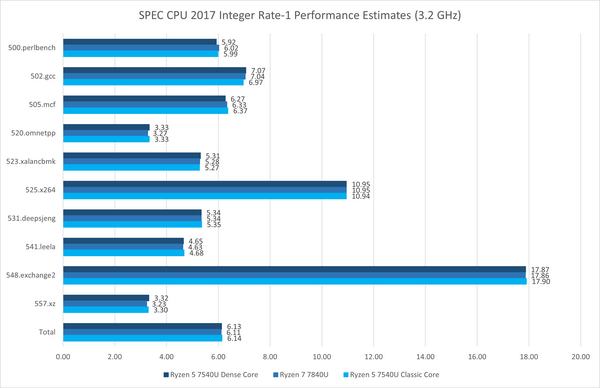
Phoenix 2 is already starting to ship, with Zen 4 and Zen 4c cores in a 2+4 arrangement. I don't think there's anything wrong with this approach: the main downside of Zen 4c cores is they cannot clock as high, but the kind of systems the SoC is going into are thermally limited to the point that using more than two CPU cores is already guaranteed to drop you down to the clock speed range that Zen 4c runs at. Ignoring the impact on chip floorplan and just looking at the implications for software, it's more like a more pronounced version of Intel's Turbo Boost Max 3.0 (preferred cores) rather than the heterogeneous P vs E core situation. All the cores have the same feature support and same performance per clock and the same sizes for their private caches.
The smaller cache will make it a heterogeneous situation for some workloads and likely games as well (seeing how 5800x3D/7800x3D are demolishing the competition thanks to a larger cache).
There is no smaller cache. L1 and L2 are the same capacity (but smaller area) for Zen 4 and Zen 4c: 32kB and 1MB respectively. The L3 cache is 16MB for Phoenix and Phoenix 2, so it's actually more L3 per core for the 2+4-core Phoenix 2 than the 8-core Phoenix. It's only in the server Zen 4c processors (Bergamo) that they've cut L3 per CCX in half.
The only heterogeneity experienced by software will be due to the lower maximum clocks on the Zen 4c cores, which is a far simpler problem to deal with than Intel's P vs E cores or AMD's 7950X3D with 3D V-Cache on only one of the two CPU chiplets.
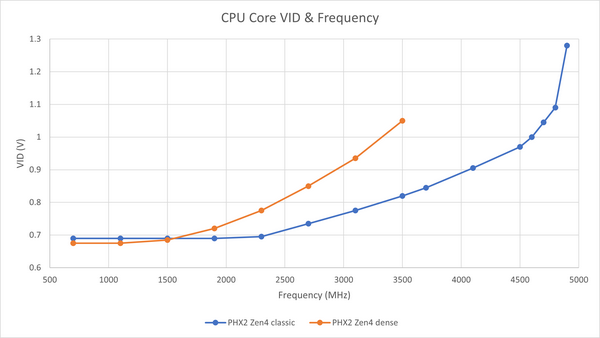
You can do more power optimizations with efficiency cores than the performance cores. There are power tradeoffs to get max perf. You can significantly reduce vcore if your max frequency is much lower. Cache is also power hungry & takes up space.
Early indications are that Zen 4c actually requires significantly higher voltage for the same clock speed as plain Zen 4 cores (though still a lower voltage than Zen 4 at speeds far beyond the reach of Zen 4c). All the savings AMD gets by targeting ~3.5GHz peak rather than 5+ GHz has been put into shrinking the core area: https://zhuanlan.zhihu.com/p/653961282
5c should be the same as 5 but with a smaller cache (unlike Core vs Atom distinction in Intel CPUs). I'd rather have a CPU full of 5c than a mix of 5 and 5c.
AMD has already released a product featuring Zen4c cores designed for servers. In contrast to Intel, AMD's small cores are not crappy; they are real Zen4 cores, with a reduction in size achieved by sacrificing some of the L3 cache and clock frequencies.
As for the future of Zen 5, we are uncertain about its development, but I am hopeful that AMD will follow a similar approach to Zen4c.
By the way, Intel employs different cores derived from their Atom line of low-power processors, specifically the Gracemont microarchitecture in their current products. Unfortunately, these cores are indeed crappy, particularly in terms of floating-point performance.
You sure about that? I think my 6800h has RDNA2. There are more rebrands in the 7000 family, though, and some do indeed have Vega chips. The person you replied to us correct but you are not.
Hopefully it will be easy to find good and not that expensive laptops with such chips.
Now I wish for a 100% hardware raytracing BHV... if raytracing stays around. I hope RDNA4 will do that. Because those horrible mesa RADV glsl shaders to do "soft" BHV, erk... (I prefer to disable RT and compile that out, and remove the glslang SDK dependency...). They should have been coded directly in SPIR-V (with a plain and simple C coded SPIR-V translater, or better, direct AMD GPU assembly code (with a plain and simple C coded AMD GPU assembler).
If you consider a laptop with Ryzen 9 7940HS, and you gonna pay with your own money, note that Ryzen 7 7840HS is pretty much the same chip. The only difference between the two seems to be a couple hundred MHz of various clock frequencies, which is barely relevant for laptops due to thermal throttling on sustained workloads.
The rest of the specs are the same, but Ryzen 7 is somewhat cheaper due to marketing. For example, at the time of writing the configurator for HP ZBook Firefly 14 G10 A laptops offered in US says the price difference is $285.
I don’t think in this case it matters even for spiky workloads. The relative difference is too small.
The difference in CPU base frequency is 3.8 versus 4.0 GHz, which is 5% slower. However, for spiky workloads boost frequency is IMO more relevant than base frequency. With boost, the clock speed difference diminishes to the laughable 2%. Specifically, they are 5.2GHz for the R9, and 5.1GHz for the R7.
AMD doesn’t publish boost clock for GPU, but relative difference in base GPU frequency is 3.6%.
I’m aware marketing generally works, making people willing to pay more just for the feeling they have the best hardware money can buy. But personally, I believe saving these $285 and getting 95-98% of the performance is a good deal.
P.S. Ryzen 5 from the same line up, the 7640HS, is substantially slower. It has fewer CPU cores, and fewer GPU compute units.
Its theoretical 120GB/s (with soldered lpddr5, the fastest) is between a M2 (100GB/s) and a M2 Pro (200GB/s).
For a portable solution it can be a nice compromise (only considering LLMs here). The only way to get 64GB of Ram (or more) with apple is with a M1/M2 Max. It's way faster (400 GB/s) but the retail price is at least ~4000€. The M2 Pro doesn't get above 32 GB of RAM.
For a while I considered a macbook pro, but the price tag, mixed with the fact that the SSD is soldered (just with LLMs, I plan a lot of mileage on them, and the failure mode of these macs is to just never boot up ever again, even with an external drive), and then I heard about the GPD Win Max 2 with an AMD 7840U. It's a lesser known brand, and I'll have to wait for early october to get mine with 64GB LPDDR5, but seeing some people receiving small parts after breakage/malfunction for previous gen also tipped the scale. For LLMs, it should be about a third the speed than a portable M2 Max, but it's a quarter the price, and I like some stuff that it can do that no other laptop can, so I'm fine with the tradeoffs.
I’ve had decent luck with zen minipcs- though the earlier gen 4700u. Take 64gb but too slow for LLMs realistically. Plus only 8gb max assignable to gpu.
I don't know if it applies to older gen, but the team behind mlc-llm are suggesting that at least with steamdeck's APU you can go beyond the cap, hopefully it applies to other APUs:
Regarding the choice of device, I'm regularly in places where 24h electricity/internet is not guaranteed, so renting cloud gpus: nope, bulky gaming laptop that chews through battery in a couple of hours: nope (even though I came really close to getting one with a RTX 4090 for 2600€, but I'm done with space heaters), frame.work 13? RAM to slow...
Mobile devices with at least 64GB of lpddr5 with decent battery consumption? The choice is quite limited.
No, the reason macs are better on LLMs is memory bandwidth 800Gb/s on Ultra 2 . I couldn’t find a good source but it seems that Ally mem bandwidth is around 70GB/s
A combination of high memory bandwidth and large memory capacity is necessary for good performance on LLMs. Plenty of consumer GPUs have great memory bandwidth but not enough capacity for the good LLMs. AMD's Phoenix has a memory bus too narrow to enable GPU-like bandwidth, and when paired with the faster memory it supports (LPDDR5 rather than DDR5) it won't offer much more memory capacity than consumer GPUs.
A mini PC with that chip, 1 TB of storage and 64GB of ram (both replaceable) costs like 800€ and fits behind your monitor. Getting that much memory in a consumer GPU is definitely quite a bit more expensive. Also, for comparison an M2 Ultra with that amount of storage and ram is 4800€.
So I am not doubting that a 6 times as expensive computer is probably "better" by some metric, but for that drastic difference I am not sure that is enough.
While I 100% agree on the price comparison, you’ll need to reach some threshold for LLM performance to consider them as usable. As Someone not very knowledgeable at the topic, the pure difference in the numbers lead me to question if you could even reach that usable performance threshold with the 800€ mini PC
Note that when referring to memory capacity, I specified LPDDR5, because that's the fastest memory option. If you want to go with 64GB of replaceable DDR5, you'll sacrifice at least 18% of the memory bandwidth. (And in theory the SoC supports LPDDR5-7500, but I'm not aware of anyone shipping it with faster than LPDDR5-6400 yet.) So you could get to 64GB on the memory capacity with a Phoenix SoC, but only by being at a 10x disadvantage on bandwidth relative to an M2 Ultra—which doesn't make a 6x price difference sound outrageous, given that we're discussing workloads that actually benefit from ample memory bandwidth.
Lately, since I'm not in my home country right now, and like playing games, I've been using my home computer with a 4070 rtx to play and stream h264 encoded game play, using GeForce experience and moonlight.
But since this uses quite some power and also I dualboot with Linux being the default (I turn on the machine with IPMI, Asus workstation board), then ssh into it, become root and efibootmgr temporarily to boot Windows on next boot and reboot.
In Windows then both TeamViewer is installed, because doing anything in GeForce Experience locks up the Moonlight "server", and the Moonlight streaming stuff, aka firewall opener, so I don't have to wireguard every time.
Although my desktop/workstation is 4k resolution, I stream at 1920×1080 resolution.
I can even stream to Twitch at the same time, but it's not ideal. I imagine, I need either a dedicated encoding card or a stronger Nvidia card than the 4070. I get some stuttering every now and then.
6Mbps goes to Twitch, 30 max to me and my 1920×1080 laptop.
Since this is all very complicated, I was thinking, have a dedicated gaming machine which doesn't consume that much power, which I can put to sleep or wake via Moonlight.
This looks like a candidate, but it's AMD and idk if that will work.
Ok, I looked it up and phoenix should work if it has VCE (which I assume it does, the article doesnt talk about it).
Ideally I could put it in some data center for a minimum fee, but that's wishful thinking, because that fee would not be minimum.
With stadia gone and shadowPC having outdated hardware for expensive prices, it could be something.
TBH I wouldn't mind renting a gaming computer with streaming, but let's be honest, all the offers assume you're not a pirate.
And that's why they're all failing.
So yeah this little box (or soc rather) could be my next hardware purchase, a dedicated game streaming machine. :)
EDIT: I retract that statement, now that I've searched for 780M performance.
It would require a dedicated GPU.
Oh well.
It's a little weaker than the Nvidia 980M of my laptop, but makes less noise. For energy efficiency it's ok, but if you like playing the latest and greatest, not an option.
It's essential 30FPS 1920×1080 gaming.


The 7840U is a beast in handhelds, and the 7940HS likewise in laptops and mini PCs. They're great for gaming, media, productivity, and anything you throw at it. Intel cannot compete with the performance and TDP of these. AMD is completely dominating the portable x86 segment, so much so, that I'm not envious of Apple's dominance of ARM. Can't wait to see the next generation of this chipset, as well as whatever Intel can produce in response.