Both RDBMS have good performance. Lots of the issues we ran into really are related to scale. If you know that your data set will never be particularly large, most of these issues will not come up. Other issues like managing replicas, promotions, etc. will be shared between RDBMS.
One of the nice things about PostgreSQL regardless of scale are the tools they provide for optimizing your application. EXPLAIN and EXPLAIN ANALYZE are really powerful tools for figuring out why a query performs badly and validating that indexing you add actually improved query performance.
The article mentions that 75TB of data is stored across 40 nodes. Does this mean that sharding is already done ? What is the CPU/RAM/Disk of each node ?
"miss the point" feels a bit strong. Rather, I get the impression Alacritty's values don't match your own values in a terminal emulator, and that's totally OK. Historically, input latency hasn't been considered a big pain point by most users.
That said, we do have a plan[1] to address this issue and be both high throughput _and_ low-latency.
Fair enough. :) I guess my stronger wording is because I don't understand workflows where being able to dump vast quantities of text to the terminal quickly is important. In general, a terminal emulator is for use by a human, and humans can't really process info at the throughput rate of other terminal emulators, much less the faster alacritty.
All that said, I'm glad to hear there's a plan on the latency front.
It's not ideal, but one flow I end up using at some points is tmux-as-grep. Basically, something either gets dumped to terminal, and I use tmux's search. So then, for a combo of reasons (some good, some bad) I cat files to terminal on occasion, and I use tmux's search to find something in it.
The idea isn't that the I'm processing at the throughput rate of the emulator - it's more that a low throughput rate delays when I can start actually looking for something useful.
I've never understood this mentality. If you can dump something to the terminal and use tmux search, you could just as easily use `less` which is pretty much purpose built for this.
The hardest part about supporting things like this on macOS is that they often require a lot of additional code or a certain design whereas on Linux, a lot of these features are provided by the window manager.
I don't consider it contrary to the project's goals if it's something that can be done unobtrusively. Given your description, it sounds like this may be something we could support easily. I filed #1544 to track this. Thanks for the suggestion!
I've noticed you don't have anything in the menu bar. The option normally appears under Window > Merge All Windows, which is inserted by default by the Xcode template.
Thanks for this additional feedback. It sounds like we should create an XCode project from scratch to get many of the defaults and figure out how to bridge this with our current implementation.
Thanks for this feedback! We haven't heard a ton of complaints about the input latency, and comments like this help us to prioritize issues. This has been mentioned in two discussions today, so perhaps it's time to address this.
Not so much a question, but I wanted to thank you for the project. It's hit a sweet spot of configurability, stability, and performance for me, all without the baggage or caveats alternatives have. It's been my terminal of choice for a while now. Keep up the good work.
We tried to strike a balance between "commonly accepted as fast" terminal emulators and coverage of "commonly used" terminal emulators. Termite gets us libvte-based terminals (like gnome-terminal), urxvt is generally considered as one of the fastest, and Kitty is another well-regarded GPU-accelerated terminal emulator. On macOS, there's not nearly as many choices.
Ultimately, it would be great if we could benchmark against every terminal emulator, but that can become a very time-consuming task. If there's another emulator you feel should be included, we can consider it for future updates/benchmarks.
I hate the moment when I lose something in history so I've set my xfce4-terminal to 250k lines which was always enough so I've tried to set scrollback history to that number. Alacritty allocated 1.4GBs during startup while Xfce can keep it within 20MBs. Any plans to allocate memory a bit less aggressively if such high number is used? Sure, without scrollbar it's kinda pointless anyway but when it gets implemented it can be useful.
Thank you
> Skia is definitely capable of good performance, as it resolves down to OpenGL draw calls, pretty much the same as Alacritty, WebRender, and now xi-mac.
This claim is a bit surprising to me. I was under the impression Skia is an immediate mode renderer which ends up issuing a lot GL calls that could be avoided with a retained mode renderer.
An immediate-style API does not mean the work is performed immediately. Skia defers and reorders internally to batch commands so minimal GL state changes are required.
That said a "lot of GL calls" for a 2D UI is actually a trivially insignificant number of GL calls to the actual GPU/driver for most cases. That's basically never the bottleneck unless you've done something insanely wrong.
I wouldn't be so sure. A single draw call is surprisingly slow. If you drew each glyph with one draw call that could be hundreds which will definitely cause slowness.
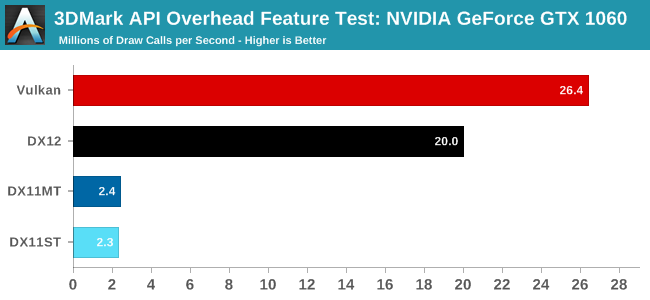
Granted that's a 1060 but since we're looking at driver CPU overhead that shouldn't matter much. So 2.3 million draw calls per second in DX11 single threaded.
It's not until you start getting into the 10k+ draw calls a frame that you are putting your 60fps at risk.
It's often worth the work to avoid this anyway, after all faster is better if you're an engine/renderer, but it takes a lot for it to be an actual _problem_
Yeah, so 2 million, cut that down by 10 for integrated graphics. Then you need 60 fps, that brings it down to 3000. If you're just doing empty draw calls and nothing else. Throw in WebGL and hundreds is really significant.
The article you linked is specifically about latency. There are other factors that contribute to overall terminal experience such as high frame rate and high throughput. Once latency reaches a "good enough" level, it becomes a non issue, and frame rate and throughput remain. Alacritty excels in those areas (there's even a table in that article demonstrating Alacritty's high throughput).
There is also a plan[1] for making Alacritty's latency best-in-class.
OneSignal | DevOps, Systems, Full-Stack | San Mateo, CA | ONSITE
OneSignal provides a simple interface to push notifications, letting content creators focus on quality user engagement instead of complex implementation. Our goal is to democratize push communication for everyone from individual blogs to top tier apps.
We are looking for talented software engineers from any background. Our stack includes Rust, Ruby on Rails, React.js, PostgreSQL, and Redis. Experience with our specific tech is not required; we are simply looking for talented people with a big appetite for learning and shipping quality code.
Word of caution when reviewing this report: it doesn't take into account vblank period. If you hit a key just after a monitor refresh, you're not going to see it until the next refresh cycle which is typically up to 16ms later. This study is concerned with how long it takes to update the frame buffer rather than time-to-visible which is difficult to measure.
That said, there are plans[1] to reduce Alacritty's input latency. Though, I personally use it as a daily driver and have never felt that there was a noticeable input lag.
Once that lands, Alacritty will have similar latency to Terminal.app _and also have_ a 60 Hz refresh rate (the "smooth" feeling), low CPU usage, and much higher throughput.


One of the nice things about PostgreSQL regardless of scale are the tools they provide for optimizing your application. EXPLAIN and EXPLAIN ANALYZE are really powerful tools for figuring out why a query performs badly and validating that indexing you add actually improved query performance.