I had totally forgotten about a Chrome download being sneaked into applications. It used a number of dark patterns like having the "install chrome" tickbox being light grey on top of white or it being hidden in "customise install" options.
Was commonplace for a while. Oracle even installed the Ask browser toolbar when you installed their database, with the same easy-to-miss opt-out checkbox. Pretty crazy.
Yes it was really annoying. I was using one of the Chromium forks and Chrome used to sneak onto the machine unless you vigilante. It felt like the bad old days of shareware and bonzi-buddy had returned.
I like using perplexity itself. However them forcing their browser everywhere is annoying.
Also Gleen Greenwald will shill absolute any old nonsense. I used to watch his occasionally and he was doing ad read for these awful ads about vegetable drinks, like Alex Jones is infamous for. It was nauseating.
Yeah, it's really disappointing. Circa 2006 his blog and analysis were insightful and something I followed closely, but his overall attitude and connection to reality radically changed somewhere between 2012 and 2016.
I used to use it at University after one of the guys I was in labs with was using it for his daily driver. The first release I tried was 3.8.
It was quite a shock coming from SuSE 9.2. It was much easier to install than FreeBSD, however the installer is even more archaic than FreeBSD. Someone wrote a graphical installer years ago and but nobody bothered with it.
The BSDs really need at least something like the archinstall.
It is certainly different than Linux. You really need to read the FAQ and manuals as you won't find much out by doing a web search, unlike Linux. One of the other things that differs from Linux is that supported hardware / software will work, however Linux hardware support is obviously a lot better than in 2005 when I first started looking at OpenBSD.
Hard disagree, the Openbsd installer is the gold standard to which all other installers compare poorly.
When I picked a linux distro to put on my system to play games on, the one I choose was void linux, why, mainly because the installer looks and feels directly ripped off from obsd.
> Hard disagree, the Openbsd installer is the gold standard to which all other installers compare poorly.
No not really. I recently took my friend through it and there is several places where it is pretty easy to screw something up. Whenever people say stuff like this, they are usually accustomed to the quirks.
> When I picked a linux distro to put on my system to play games on, the one I choose was void linux, why, mainly because the installer looks and feels directly ripped off from obsd.
Choosing distros based on the installer is kinda a bit silly. I've done a Linux From Scratch build and I can tell you there is very little difference between one distro an another.
>> Hard disagree, the Openbsd installer is the gold standard to which all other installers compare poorly.
> No not really. I recently took my friend through it and there is several places where it is pretty easy to screw something up. Whenever people say stuff like this, they are usually accustomed to the quirks.
Like what places, and how are they pretty easy to screw up on? I'm genuinely curious, as to me it's the cleanest and most straight-forward console installer I've ever experienced. I managed to get it done the very first time I, 25 years ago, with zero *nix experience, decided to try OpenBSD. Also, you can always exit the installer and restart the process. You're not "screwed" unless you reboot at the end without having reflected over your instructions.
> Like what places, and how are they pretty easy to screw up on? I'm genuinely curious, as to me it's the cleanest and most straight-forward console installer I've ever experienced.
To you it is. I installed on 3.8 and it was not straightforward. I used to go to university with a guy that used OpenBSD and he even said the installation at the time was straight forward. So it isn't just me.
I can't remember specifics as it was about 4-6 months. It was something to do with drive labelling IIRC, it was super confusing and I think I just ended up removing drives temporarily.
> you can always exit the installer and restart the process.
Nope. I tried that. It did not work.
> You're not "screwed" unless you reboot at the end without having reflected over your instructions.
The installer is a plain *sh script. You simply ctrl+c to break out and return to the shell, then run "install" to start the script again. I can't see why you would end up with an installation medium containing a different installer than everyone else.
> The installer is a plain *sh script. You simply ctrl+c to break out and return to the shell, then run "install" to start the script again
I ended up in situation where that wasn't possible. I wasn't sure how that happened. But it did.
I have done many installations over the years on real hardware and VMs. It only happened once, but it can happen.
I could also bring up the issues with the auto partition layout that is suggest which can make impossible to install any larger of software after installation. Or how the disks can be confusingly labelled in some cases (especially in VMs).
The point being communicated is that it isn't as straightforward as many people claim.
I first started mucking about with it in like 3.8/3.9, and you had to do something which was very archaic (even for 20 years) with calculating partition size, so it has improved.
> I can't see why you would end up with an installation medium containing a different installer than everyone else.
I don't appreciate how you worded this.
I am not lying about my experience. I just can't remember the exact set of steps of what happened because it happened several months ago now.
> very little difference between one distro an another
These days the differences come down to systemd or no systemd. I joke that we should refer to it all as SystemD/Linux (akin to how "GNU/Linux" was used).
I did the LFS build with SysV init scripts. I think there is a systemd version of LFS. LFS was a good learning exercise to see generally how everything was put together. I wouldn't want to manually manage all of this myself.
If you look at the LFS compile instructions for each package they are essentially the same as the PKGBUILDs scripts in Arch, I suspect it is similar with Gentoo, Void or any other similar Linux distro.
It feels like Alpine tries to imitate the OpenBSD installer somewhat as well, but it is just not the same as it forces you to make choices between SSH servers, NTP daemons, etc. So, it still very much feels like the Linux "pick and mix box". What makes OpenBSD so special is that there is one choice, it tends to be a good choice, and it is the only choice they will support and therefore they will put in the hours to make it solid.
> the Openbsd installer is the gold standard to which all other installers compare poorly.
Very hard disagree.
It took me half a dozen installs in VMs before I dared try on hardware. I never managed to get the Arm64 version installed at all, due to the cryptic minimalist info the installer gave me, which wasn't anywhere near enough to go on.
I have it on hardware now. It took a day or 2 of work but now it runs it's totally stable. However, the Byzantine partitioning scheme it uses means that although I gave it 32GB of disk, I don't have enough disk space to install Xfce.
It is on a Thinkpad W500, on a ~250GB SSD, multibooting with WinXP64, and NetBSD 10, and both Crunchbang++ Linux and Alpine Linux.
I tend to find that people who praise the installer tell me that it's never crossed their mind to dual-boot and they find it simple because they single-boot it on a very over-specced system where space restraints don't matter much.
Similar thing with the disk layout happened to me in a VM. I just did auto layout and one of the partitions were so small I couldn't install any other software. I ended up remaking the VM and just using two partitions for the entire disk IIRC.
They have gotten used to stuff like this and think is normal.
Debian has similar issues with making partitions too small. It makes the /boot partition so small that if you have more than a couple kernel images, you run out space. If you use the LUKS crypt with LVM, the suggest layout would have vg-root too small.
If you use archinstall as I said you can be up and running in 20 minutes on a fast connection. You literally just state what you want setup through a menu, make a hot drink and you have a working desktop. It is pretty hassle free in my experience.
I haven't tried the FreeBSD installer in a couple of years but I always find that I end up lost in the menus or something doesn't work correctly. Then I am kinda left faffing trying to get X working, ports or something else working. I couldn't set the desktop resolution properly and I suspect there was some magic flag I had set somewhere or install firmware.
I just can't be bothered when I can install Debian or Arch in about 15-20 minutes and everything works fine.
>I just can't be bothered when I can install Debian or Arch in about 15-20 minutes and everything works fine.
And that's perfectly fine, i would also never criticize people who just buy a Mac, some people are just interested in different stuff. However if you have problems getting lost in "menus" but wanna try out a BSD try GhostBSD:
> And that's perfectly fine, i would also never criticize people who just buy a Mac, some people are just interested in different stuff.
I used to be an operating system enthusiast. I've tried them all at one time. I just have a job now (I have to use Windows at work) and I just not interested in faffing to get graphics working. The experience hasn't changed that much with FreeBSD in 20 years. Some might be okay with that, but I don't really want to have to spend 3 days getting a basic desktop environment behaving properly.
OpenBSD is better in this regard than FreeBSD, I've found.
> However if you have problems getting lost in "menus" but wanna try out a BSD try GhostBSD: https://www.ghostbsd.org/
This is kinda like distro-hopping. I don't want to run some weird fork of the OS, because you will end up with a new set problems potentially. I don't use derivative distros for this very reason and only use mainline distros.
I don't understand why (I don't care for wanky reasons that often quoted) that there isn't a mechanism for me to quickly get up an running with a desktop. The situation hasn't changed in 20+ years. Whereas Linux (for all the faults that it has) has effectively had this problem solved for over a decade now.
> It's really a YOU problem, i have working X on all my machines, have a good day.
Not at all. I can read the man pages and docs fine. Stuff like this should work out of the box by now. It doesn't with the BSDs typically. That is the reality.
Also, it isn't just X. It is other issues once you have X working.
Once you spent a good few hours sorting things out, there is almost no benefit over running a decent Linux distribution where almost all of this working OOTB.
I don't understand why you are getting bent out of shape. I am simply stating the facts as I see them.
> You do You and that's good, just use what you like.
Well obviously I am going to use what I like.
However stating that doesn't mean you stop me (or anyone else) from making constructive criticisms of something you like.
I have used tried many of the *nix variants over the last 20 years. It is just easier to use Linux if you want a desktop OS.
> Super happy for you, you found your OS and that's fine,
That isn't what I said. I said that Linux is easier than BSD for a desktop and there is no real reason why that should be the case. That is an objective fact.
I would rather use neither of these systems, but the alternatives are worse. At the moment Linux is the least worst option if you want a Desktop OS.
> but also super proud of myself that i can setup X on every FreeBSD machine so nonchalant ;)
As I said it isn't just X.
The point that you don't want to engage with (bit childish tbh), is that a lot of this should completely unnecessary. There really should need to be a fork of the OS for having a desktop configuration that works reasonably well out of the box.
That is failure of both the OS and the community, which judging by your username you seem to be a member.
False. There is some config required (these are in the READMEs that are in each package that specified what options need setting) and BTW some of it doesn't work on supported hardware.
If I turn my kettle or microwave on in my kitchen it will kill any bleutooth or wifi signal. My microwave is getting on for 15 years old, maybe newer ones are better, but the kettle was bought last year.
If you cannot change the microwave, consider trying a different wifi channel. I once had a 2012 Panasonic microwave that killed 802.11g channels 7 and 14 but not channel 0.
I am not too bothered about it. I only use it every other day for about 3 minutes to heat up some porridge. I keep on meaning to buy a new Microwave, I bought it in ASDA 15 years ago for £30 and it just keeps on working.
Arch has an installer these days. It works pretty well and you can have a system up and running in about 20 minutes if you have a fast internet connection.
For people that want a Windows like UI, I would probably suggest Cinnamon. It works pretty much like Windows 7/10 without all the visual nonsense that KDE typically has.
My experience is that KDE 6 has very little visual nonsense right out of the box. 4 and 5 did have a lot more, but most/all of it could be disabled. Most other Linux DEs don't really let you customize them to your own personal level of nonsense at any rate.
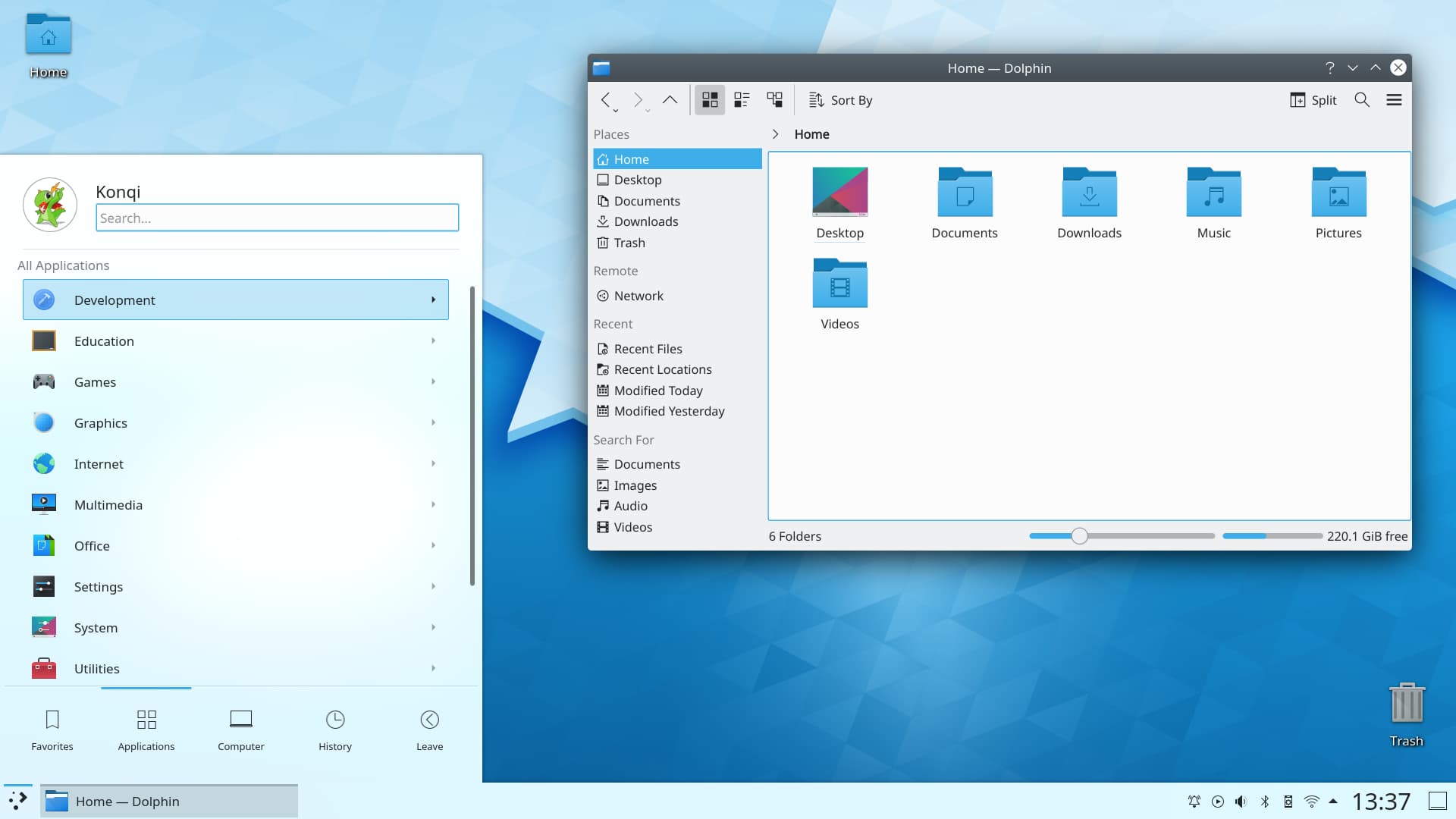
This is a screenshot from their site. Just in this screenshot I see the following:
1) there is an horrendous text shadow effect on the text under the "Home" desktop icon in the top left.
2) Clock text is too large compared to the rest of the interface, especially the icons next to it.
3) Trash Icon looks like out of place compared to the other icons.
4) Drop shadow effect on the window and the start menu thing. It kinda too dark really.
5) Every single gap between interface elements seems different and off. The icon sizes seem a bit all over the place.
6) There is a gradient on the window title bar and rounded corners. Cinnamon does this as well. I dunno it is very Window XP Luna (which I never liked).
7) The window control icons look off to me and don't fit in with the rest of the interface IMO.
A lot of this I appreciate can be probably be changed. But that is how it comes OOTB if it is an official screenshot. It feels like a Windows Vista ripoff.
Generally I find KDE lacks "taste". None of the Linux GUIs are that great tbh. People put up fancy screenshots, but I guarantee the moment the windows are arranged in any other way it looks not so great.
I agree with your assessment of KDE lacking "taste". Imo, it looks like a system designed by engineers, not designers.
GNOME has the opposite problem imo. I feel like it has "taste", but it feels like a system fully designed by designers, with no engineers giving practical pushback. It's the same issue macOS has, but amplified: Designers have some grand idea about their vision being the one true way of using the system and made it hard to impossible to customize.
I currently use KDE, but am not happy with it for the reasons you described. I used to use GNOME, but wasn't happy with it for the reasons above.
I have high hopes for Cosmic [0]. It seems like that one might get the balance right.
> I agree with your assessment of KDE lacking "taste". Imo, it looks like a system designed by engineers, not designers.
TBF, I was linked their more up to date screenshots in a sibling thread and it does look more consistent but it still seems off.
> I currently use KDE, but am not happy with it for the reasons you described. I used to use GNOME, but wasn't happy with it for the reasons above.
I don't like any of the Linux DEs tbh. They all have issues.
I might give KDE a go. But I think Debian does a poor job at packaging it and I don't really want to change distros.
> I have high hopes for Cosmic [0]. It seems like that one might get the balance right.
I tried compiling Cosmic on source on Debian 12. I ran out of memory on the VM I was doing it on. I also found out that on Debian 12 their rustc was broken!
Do you think GNOME has similar UI issues? In my view, it's "pretty", but just doesn't let me configure it the way I want it to without hacking around way too much.
I ended up installing Dash To Dock and Ubuntu App Indicator Icons when I was using it and I ended up with something decent. I also usually have to faff around in the gnome tweaks tool to get the old "legacy" apps and the new apps looking consistent.
With that level of nit picking everything is off and there is no OS / DE with zero inconsistencies.
KDE is good for me. I admit that I simplify the interface in a new setup turning off some things but the fact that it gives me that capability is a huge plus for me.
> With that level of nit picking everything is off and there is no OS / DE with zero inconsistencies.
It isn't nitpicking. Those are like quite noticeable and actually quite bad. By the looks of it, a lot of this has been addressed now. But tbh it shouldn't have been there in the first place.
Of course there isn't any OS/DE with inconsistencies the fact that I spot that within like literally a few seconds on such a basic screenshot is indicative of other issues.
Even if it was nitpicking, to create something of high quality you should be extremely critical of your own work. That is how you actually make improvements.
> KDE is good for me. I admit that I simplify the interface in a new setup turning off some things but the fact that it gives me that capability is a huge plus for me.
Things shouldn't need a bunch of changes out of the box for them to be okay. I find that KDE (and have always had this impression since KDE 2 or 3) is it feels they bung a bunch of features in as a checklist. That doesn't create a good interface.
Unfortunately people will defend it. I am not sure why.
Stock Konsole on the left, stock Ghostty on the right. Note that both terminals have multiple tabs open. The amount of wasted space and visual noise in Konsole is baffling. Not to mention Ghostty is able to display 4 more lines of actual console output (you know, the whole point of a console).
In my experience, many KDE apps follow the same UX. Great for configuration and being able to use primarily the mouse, bad if you are more interested in a keyboard centric flow with a focus on the content.
KDE actually was built around the Windows paradigm; Gnome is a Mac clone. Cinnamon is a fork of Gnome maintained as a side project from a distro with a bad security and management track record. Really the only thing it adds is a launcher; KDE optionally provides the same style if the user wants it.
Go find a thread where your pet software is on topic. This thread is about KDE Connect. Does Cinnamon support that? Does Cinnamon offer anything like it?
> Cinnamon? Really? In a KDE Connect thread?
> Go find a thread where your pet software is on topic.
> This thread is about KDE Connect. Does Cinnamon support that?
In this particular part of thread, people were talking about Windows UI replacements. Like it or not conversations do diverge from the original intended purpose.
Secondly, Cinnamon isn't my "pet software". Cinnamon IMO is more similar to the Windows 7/10/11 UI than KDE and has none of the fluff that KDE normally has in it. I actually don't really like any of the Linux UIs. I think they all suffer from significant issues.
> KDE actually was built around the Windows paradigm; Gnome is a Mac clone. Cinnamon is a fork of Gnome maintained as a side project from a distro with a bad security and management track record. Really the only thing it adds is a launcher; KDE optionally provides the same style if the user wants it.
It seems that you really don't like cinnamon and thus why you are being so aggressive. I don't really appreciate the unwarranted hostility.
I don't personally use Linux Mint (I use Debian). I don't like derivative distros for the reason that you highlighted. However Cinnamon seems works reasonably well and tends to be quite a bit lighter than KDE IME.
> This thread is about KDE Connect. Does Cinnamon support that? Does Cinnamon offer anything like it?
You are aware that you can use KDE software in other Desktop Environments? It took me a few seconds to do a web search and it seems that you can use KDE connect and Cinnamon at the same time.
I use Debian 13 (stable). It is very solid. I was using Debian Trixie when it was testing and there was breakage twice.
I would make the /boot partition twice the size the installer suggests though as on my laptop I can't upgrade the kernel because the /boot runs out of space. The laptop is used to view old manuals in PDFs while working on my car so I don't really care.
TBH any of the major Linux distros that have been around for a while are fine. I don't like Fedora or Ubuntu because they are a bit corporate.
I personally wouldn't bother with any of the derivative distros. Typically there isn't a lot different other than they've pre-configured some packages. IME that causes more headaches long term.
Yeh. I'm used to using old version of RHEL at work so I ended up learning how to deal with slow moving distros.
I use the OS as a base system and most of the stuff that needs to be newer versions can be done by installing the binary to to ~/bin as it is added to your path by ~/.profile if the directory exists on Debian.
Stuff like Discord, Slack, Kdenlive, OBS etc. I install using flatpak.
Other stuff. Go, Vim (I compile vim from source) and nvim can stuff can be compiled or dropped into /usr/local
That covers most stuff IME. However I appreciate this won't work for everyone.
This tactic is often used to get attention. There was outrage about this in the late 2000s when reality TV/talk show series followed people in a particular poverty stricken area in the UK.
No. What is stated by the manual is what cat does. What you said was simply incorrect.
It does have the effect of what you describe if one file is supplied and might be the most common use case. That doesn't make your description correct, at best it makes it incomplete.
I had a Powercolor 9000 pro "Evil Commando". My friends and I thought it looked like a terrorist out of some old action movies. It kinda looked a bit like Universal Soldier.
Later on I bought a Sapphire 9800pro "Atlantis" which had some T1000 esque figure on the box art.
After that a lot of stuff becoming more corporate and boring.